Showing posts with label Labs. Show all posts

08 November, 2015

Digital Software And Programs We Use At CalArts


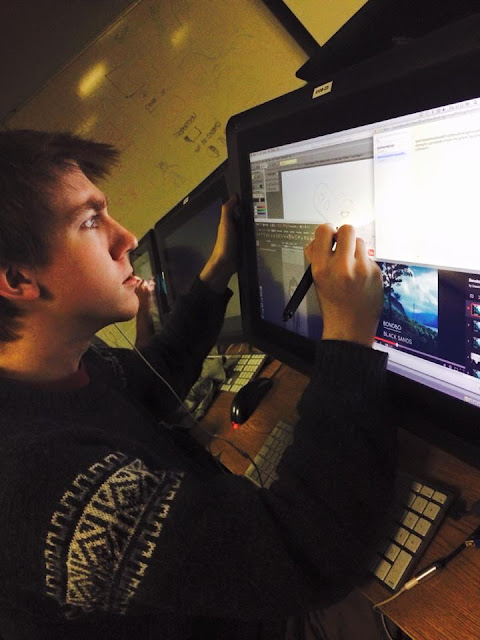
The first time I walked into the Labs at CalArts, I was initially taken aback upon greeting numerous faces engulfed in their computers.


I was surprised by how many people use computers to make their art. And I was surprised to learn how much the animation industry itself is governed by digital art.

Before attending CalArts, I had only made art in the traditional way. I knew digital art existed, but I thought it was much less common to use as a tool than it really is. I had assumed that computers were mostly used for computer animation.

However, I soon immersed myself in it. My whole first-year-film was made on a computer. And while I still believe it is important to know how to craft art traditionally, I realize that it has also become essential for you to be familiar with digital computer software. So I thought I’d share which programs we used during my first year at CalArts. If you’re aiming for CalArts or any school in animation, I’d highly recommend exploring these software before attending!

Photoshop
Most of you will have heard of this program. I used Photoshop for the backgrounds in my first-year-film. We also use this software for our character design classes. It’s a good program for making detailed drawings because it offers you so many opportunities for making it look professional, such as various brushes, colors and layers. You can learn a little about how different artists use Photoshop from the book 21 Draw.

TVPaint
I used this program for animating my first-year-film. It’s a relatively easy set-up that allows you to flip between your drawings, draw on top of rough animation, and much more!

After Effects
This software is great for creating effects and camera moves. These are things you can also do in TVPaint, but I personally find it easier to use After Effects. When I say effects, I mean things like explosions, glittery magic particles, creepy shadowy fog… You can really go for it and make some really cool things with this program! However, for my first project in After Effects, I chose to keep it relatively simple and make snow. If you’re new to the program and would like to get to know it before using it for a huge project, I’d recommend taking some time to think about something very specific and simple you’d like to create in it. Then try to make it! When you know what you want to make, it becomes less overwhelming to experiment with unfamiliar software.

Premiere Pro
I used Premiere Pro to composite my film and add sound. A Program that is very similar to Premiere Pro is Final Cut Pro. Some students also used iMovie for their film.

Maya
We use this program for computer animation, modeling, rigging, and environments.  


I realize these programs are all very expensive. You can get a student version of Maya, but the other programs are quite an investment. If you are only interested in getting one of these software, I’d place my money on Photoshop. Of course, you get the most out of exploring this program if you also have a tablet or a cintiq to draw directly on.

On a side note, I should warn you that one downside to learning digital programs is the confusion you feel when in real life you automatically and continuously start pushing an imaginary "undo" button while drawing and nothing happens…

Anyway, I hope this post has inspired those of you who love making traditional art to go out and make yourself comfortable with these digital software programs. It will really help boost your confidence if you know how to work digitally and with different software! And to those who already work digitally, I hope this helped shed some light as to which programs go into the making of the CalArts films each year!


-Christine-
12 October, 2015

Tips For The CalArts First-Year-Film


Throughout the year, many CalArts students worry that they won’t finish their films, that their files will be lost, or that some unforeseen event will prevent them from entering the Labs (the rooms where most students create their films digitally on cintiqs -- computers with a touch-screen that allow us to draw directly on the screen). 


I was no exception. I worried, since I had never made a film or a project on such a grand scale as the first-year-film before. 

At CalArts, every student makes a short-film over the course of the year (on top of their regular classes) that is due in the end of April. Faculty then gathers in a room, watch them all for about seven hours, and grade these films. The ones with the highest scores are selected for the Producers' Show – a screening in Hollywood with notable guests of the film and animation industry.


BFA1s preparing for the CalArts Producer's Show 2015

As a BFA1, the task was to create a ninety-second animated film without dialogue, in black and white, and with the correct settings and format as set forth by CalArts. My assignments until this movie had all been three-second animation clips that could take me up to three weeks or more to perfect. I thought of my film as a series of three-second clips – otherwise it was too daunting!

When I was making the film, it really hit me how crazy the concept of animation is! Let’s draw every frame of a film!

My classmate became a part of CalArts itself while creating his film


Even so, I would do it all over again if I had to! I had the most fun making the film and felt excited getting up to work on it in the morning. It really is true that you learn the most from doing something, as opposed to theorizing about it. I learned so much making this film – about the programs I used, such as TVPaint, Premiere Pro, Adobe After Effects, and Photoshop; about story-boarding; about sound effects; and about animation!

If you’re a first year at CalArts about to make your own film, here are some of the things I did that I found worked really well for me over the five months I worked on it. I also share some thoughts on what I would have done differently.

Make a schedule
I planned out a schedule early on and stuck to it. For instance, I knew I had to animate a total of five seconds a day for a certain number of weeks. I had a week to make the intro. I had to be done with rough animation on a certain date so I could move on to clean-up, etc. In this way, I was able to finish on time.

Find a daily workflow
I found getting up early in the morning to work was the best workflow while I was making the film. On the weekends and during Spring Break, I would be ready to start working at 6.30am and be done by 11pm at night. If I went later than that, I still got up to start early the next day. I’d also recommend working on your film daily, as opposed to on certain days, even if you have 9 hours of classes (for me, the “Long Tuesday”). Just get a little done every day. If that doesn’t work for you, set a deadline of things you have to have finished weekly. 

Hold off compressing your files
I would recommend waiting to export your files from TVPaint with the best compression until you are in the finishing phases of production (by this, I mean exporting them as TIFF/PNG vs. Photoshop. ALWAYS use the correct format and plan your shots as 1920x1080 and 24 fps and nothing else, unless CalArts has changed the rules. Double-check with Fran Krause). Just make sure to save the original files from TVPaint, and not just your exported images. This way, you won’t have huge files and you can go back and make changes without waiting a very long time for everything to export again. Also, rendering won’t take as long. Then, composite your files with the correct compression when you you’re happy with the result. There is something very satisfying about being done and waiting for everything to render.

Test the camera moves
There are many camera moves in my film. Before making my backgrounds, I tested out the camera moves with rough sketches in After Effects to make sure my backgrounds would be the right size. For example, I have a shot in which we pan down Sleeping Beauty’s Castle in Disneyland Paris. In the story-board, there was plenty of time for a slow-pan and the full castle because I showed three separate drawings to make the illusion of a camera move. But once I tested it out, the actual camera move was too fast and the whole mood was ruined. And the movie could be no longer than ninety seconds! I couldn’t drag out time (neither did I want to). So, I “cheated” and made the castle smaller than it is so that the move does not take up as much time. Hopefully, the viewer can’t tell when they watch it! 

Back-Up
I had multiple back-ups for my files on USB-sticks, Gmail, my hard drive, and my CalArts user account. I use the Toshiba DTD210 1TB hard drive for storage.

Think about your health
I made sure to drink enough water and to go for walks outside. When you’re sitting inside all day in a dark room without windows and staring at a screen, fresh air and exercise can work wonders for your energy levels. A group of us went outside to play Frisbee daily.

Take breaks
I scheduled breaks. I would start at 6.30am and work until 10am. Then, I had a 30-minute break during which I had a few snacks. Then, I had a break again around 12pm to eat lunch. And another break at 3pm. And another at 6pm for dinner. If I had classes during the day, I would consider the class a 3-hour break. During a regular break, however, I would play the game Ligretto with my friends to do something non-computer related.


Pick classes wisely
I did all my reading/writing assignments for my “critical studies” classes in January/February, ahead of time. Otherwise, I knew I wouldn’t have time to finish these assignments once crunch time came around. Many of my classmates had to drop classes halfway through because it was too much. If you’re able, I’d recommend not having any classes that will take up a lot of your time during the Spring semester.

Regrets
If I could change anything, I would have started exploring story ideas earlier. This way, you have enough time to massage the story and make it the way you want it to be, while still feeling confident you have enough time for the rest of production.

If I could, I would go back and ask for more input from faculty and peers. I received a lot of feedback for my story. But for executing my film, I should have asked for more advice and shown more people what I was working on. The teachers are right there and they are so helpful!


-Christine-